Building a Claude Code-Style AI Agent for Enterprise Integration
How we built WSO2 MI Copilot -a domain-specific agentic coding assistant with 23 tools, 4 subagents, a dynamic knowledge graph, and a context engineering strategy that achieves 81-90% prompt cache hit rates.
Introduction
The emergence of agentic coding assistants -Claude Code, Cursor, Windsurf, Codex -has demonstrated that LLMs become dramatically more useful when given tools to act on the world, not just generate text. But these are general-purpose. What happens when you apply the same architectural patterns to a domain-specific development environment?
We built WSO2 MI Copilot: an agentic AI assistant embedded in VS Code for developing enterprise integrations on the WSO2 Micro Integrator platform. The architecture draws heavy inspiration from Claude Code -the ReAct loop, tool-based autonomy, multi-agent delegation, conversation compaction, undo checkpoints -but adapts these patterns for a constrained domain where the context engineering challenge is fundamentally different.
This post is a technical deep dive. We’ll cover:
- The ReAct execution loop -how streaming tool calling creates an autonomous agent
- Why domain-specific is harder -the edge case problem and why models fail without engineered context
- Context engineering -the three-layer architecture that makes a domain agent dramatically more effective
- Dynamic knowledge loading -a structured knowledge graph the agent queries on demand
- Multi-agent orchestration -subagent spawning, background execution, and conversation compaction
- Prompt caching and context economics -achieving 81-90% cache hit rates, and managing tool result bloat
- Shell sandboxing -letting an agent run commands without letting it destroy your environment
- LSP integration -ground-truth XML validation as the agent’s self-correction mechanism
- The mode system -structured autonomy through Ask/Edit/Plan
- What didn’t work -approaches we tried and discarded
- What’s next -local embeddings, vector search, and semantic code retrieval
We’ll reference relevant research where the patterns align with published work, and provide concrete implementation details throughout.
1. The ReAct Loop: Reason + Act in a Streaming Loop
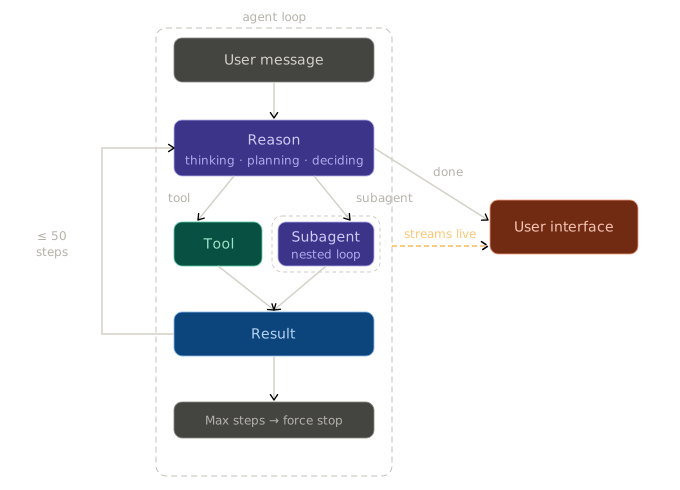
MI Copilot’s core execution model implements the ReAct (Reasoning + Acting) paradigm introduced by Yao et al. (2023) 1. The agent interleaves reasoning (thinking through a problem) with acting (calling tools), using observations from tool results to inform the next reasoning step.
Implementation: Vercel AI SDK streamText with Multi-Step Tool Calling
The agent uses the Vercel AI SDK’s streamText function with stopWhen: stepCountIs(50), creating a loop where the model can make up to 50 sequential tool calls per user message:
STREAM_TO_CLIENT(
    model       = Claude Sonnet 4.6 (or Opus 4.6),
    max_tokens  = 15,000,
    messages    = [system_prompt, ...chat_history, current_user_message],
    tools       = 23 registered tools (filtered by active mode),
    stop_after  = 50 tool-call steps,
    reasoning   = adaptive,        // model decides when to think deeply
    effort      = low              // bias toward direct responses
)

// Callback: fires before EACH API call in the multi-step loop
BEFORE_EACH_STEP(messages):
    mark last message with cache-control = ephemeral   // prompt caching
Each “step” in the loop follows the ReAct pattern:
Observe → Think (optional reasoning block) → Act (tool call) → Observe result → Think → Act → ...
The prepareStep callback fires before each API call within the loop, allowing us to update cache breakpoints as the conversation grows with tool results. This is critical -without it, each step would re-send the entire conversation without caching benefits.
Extended Thinking: When to Reason Deeply
Claude’s extended thinking (adaptive mode) adds a reasoning trace before the model’s response. We enable it by default but configure effort: 'low' to let the model decide when deep reasoning is warranted:
thinking_start → thinking_delta (streamed) → thinking_end → text or tool_call
The system prompt explicitly instructs: “Extended thinking adds latency and should only be used when it will meaningfully improve answer quality -typically for problems that require multi-step reasoning. When in doubt, respond directly. More importantly: Do not Overthink.”
This aligns with findings from the chain-of-thought literature 2 -shallow problems don’t benefit from explicit reasoning traces, and forcing them can actually degrade performance on simple tasks.
Stream Processing Architecture
The streaming loop processes multiple event types in real-time:
| Stream Event | Handler | UI Effect |
|---|---|---|
text-delta | Accumulate text | Live markdown rendering |
reasoning-start/delta/end | Track thinking blocks | Collapsible thinking display |
tool-input-start | Early tool detection | Show “Running tool…” immediately |
tool-call | Execute tool | Status indicator (spinner → check/error) |
tool-result | Feed back to model | Next reasoning step |
finish | Persist to JSONL | Save conversation state |
The tool-input-start event deserves special mention -it fires when the model begins generating tool input JSON, before the tool actually executes. This lets us show a loading indicator to the user immediately, reducing perceived latency.
Stream Watchdog: Timeout Management
A dual-timeout watchdog prevents the agent from hanging:
WATCHDOG = create_stream_watchdog(
    idle_timeout   = 2 minutes,      // max silence between stream events
    total_timeout  = 10 minutes,     // hard circuit breaker for entire run
    pause_idle_when = tool_is_executing OR waiting_for_user_input
)
The idle timeout pauses during tool execution (some tools like build_project take minutes) and during blocking operations like ask_user_question (which waits for user input). The total timeout acts as a hard circuit breaker.
2. Why Domain-Specific is Harder Than General-Purpose
It might seem like building a domain-specific agent would be easier than a general-purpose tool like Claude Code -smaller scope, fewer languages, constrained problem space. The opposite is true.
The Model Doesn’t Know Your Domain
Claude, GPT-4, and other frontier models have been trained on vast corpora of Python, JavaScript, TypeScript, Rust, Go -languages with millions of public repositories and decades of Stack Overflow answers. When Claude Code edits a React component, the model draws on deep statistical patterns from hundreds of thousands of similar components.
WSO2 Synapse XML is not Python. The training data is sparse. The model has seen some Synapse configurations, but not enough to internalize the subtleties -and the subtleties are where integrations break.
The Edge Case Problem
Consider this Synapse expression: "Count: " + payload.count. Looks reasonable. In JavaScript, Python, or almost any mainstream language, this concatenates a string with a number. In Synapse’s expression engine, it throws a runtime exception -the + operator doesn’t coerce types, and string + integer is undefined.
Or this null check: payload.age == null or payload.age > 18. Seems defensive. But if payload.age is truly null, the second operand still evaluates and throws "Null source value" before the or short-circuits.
Or this equality check: 1 == 1.0. Returns false in Synapse -it compares as strings "1" vs "1.0".
Or this perfectly reasonable-looking API definition: <send/> at the end of an inSequence. In most integration platforms, “send” means “send the response.” In Synapse, <send/> sends the message to the endpoint and <respond/> sends the response to the client. The model will generate <send/> because every HTTP framework it’s trained on uses “send” for responses -and the integration silently hangs, waiting for a backend that was never called.
These aren’t corner cases in obscure features. They’re fundamental type system behaviors that a model trained primarily on mainstream languages will get wrong every time -because the patterns that are correct in 99% of programming languages are incorrect in Synapse.
We documented dozens of these edge cases across type coercion, null handling, integer overflow, XML escaping, payload factory pitfalls, and error propagation. Without this context, the agent generates code that looks correct, passes a casual review, and fails at runtime.
This is the fundamental challenge of domain-specific agents: the model’s priors are wrong, and you have to override them with precise, verified context at every turn.
What a General-Purpose Agent Can’t Do
A tool like Claude Code can edit Synapse XML files -it’s just text. But it can’t:
- Validate generated XML against the MI schema -it doesn’t have a language server
- Know which connectors exist for the user’s runtime version -it doesn’t have the Connector Store API
- Check if an expression will throw at runtime -it doesn’t know Synapse’s type coercion rules
- Detect that a property scope is wrong -it doesn’t know that
$ctx:uri.var.petIdworks in API resources but not in sequences - Build and deploy the project -it doesn’t know how MI’s Maven build or runtime server work
- Look up mediator semantics -it will guess from the XML tag name and often guess wrong
MI Copilot fills these gaps with engineered context, specialized tools, and a language server integration that provides ground-truth validation. The model doesn’t need to know Synapse -it needs to be given the right information at the right time and have tools to verify its work.
The 23-Tool Surface
We mention “23 tools” throughout this post. Here’s the full inventory -each tool exists because a general-purpose agent would need it but doesn’t have it:
| Category | Tools | Count | Why It Exists |
|---|---|---|---|
| File Operations | file_read, file_write, file_edit, grep, glob | 5 | Structured editing with LSP sync, not raw filesystem writes |
| Connectors & Context | get_connector_definitions, load_context_reference | 2 | 100+ connectors from live Store API; 12 deep reference docs |
| Project Management | add_or_remove_connector | 1 | Updates pom.xml dependencies -model can’t guess Maven coordinates |
| Validation | validate_code | 1 | LemMinx LSP diagnostics with code actions |
| Data Mapper | create_data_mapper, generate_data_mapping | 2 | TypeScript schema-to-schema mappings via specialized sub-agent |
| Runtime | build_project, server_management | 2 | Maven build + MI server start/stop/status |
| Planning & Subagents | create_subagent, ask_user_question, enter_plan_mode, exit_plan_mode, todo_write | 5 | Multi-agent delegation, human-in-the-loop, task tracking |
| Shell | shell, kill_task, task_output | 3 | Sandboxed command execution with background process support |
| Web | web_search, web_fetch | 2 | Approval-gated web access for external information |
3. Context Engineering: The Domain-Specific Advantage
Context engineering -the deliberate construction of what goes into the model’s context window -is arguably more important than the model itself. Anthropic’s own documentation describes it as “the art of providing the right information in the right format at the right time.” 3
For a domain-specific agent, context engineering is where you win or lose. A general-purpose coding assistant has to work with whatever the user throws at it. A domain-specific agent can be opinionated about what context matters.
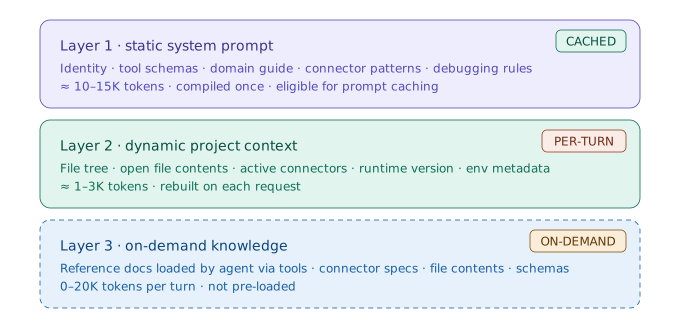
The Three-Layer Context Architecture
MI Copilot structures its context into three layers, each with different caching characteristics:
This layered approach is inspired by the observation from Anthropic’s context engineering guide that “the most effective agents separate static knowledge (system prompts) from dynamic knowledge (tool results)”.
Layer 1: The Static System Prompt (~3,100 lines)
The system prompt is a carefully structured document with 17 major sections:
- Identity & behavior -concise, professional, markdown-formatted for VS Code sidebar
- Operating modes -Ask/Edit/Plan mode descriptions and switching logic
- Tool usage policy -when to parallelize, when to use subagents vs. direct tools
- User query processing policy -a step-by-step workflow: scope → requirements → design → context → implement → validate → build → test → cleanup
- Synapse guide -embedded XML syntax reference (version-selected at runtime: v2 for >=4.4.0, v1 for older runtimes)
- Connector documentation -usage patterns and initialization templates
- Debugging guidelines -common MI issues and resolution patterns
- Deep reference index -descriptions of 12 on-demand context references the agent can load
The guide selection is version-aware:
system_prompt = TEMPLATE
    with SYNAPSE_GUIDE    = modern_guide   IF runtime_version >= 4.4.0
                            legacy_guide   OTHERWISE
    with CONNECTOR_DOCS   = modern_docs    IF runtime_version >= 4.4.0
                            legacy_docs    OTHERWISE
This avoids a common failure mode in domain-specific agents: generating code for the wrong version of the platform.
Layer 2: Project Context Assembly
Every user message is wrapped with project-specific context assembled from live workspace state:
<project_structure>
├── src/main/synapse-config/
│   ├── api/CustomerAPI.xml
│   ├── sequences/ErrorHandler.xml
│   └── endpoints/BackendEP.xml
├── src/main/registry-resources/
└── pom.xml
</project_structure>

<ide_opened_file>src/main/synapse-config/api/CustomerAPI.xml</ide_opened_file>

<available_connectors>Database, Email, File, HTTP, Salesforce, ...</available_connectors>
<available_inbound_endpoints>HTTP, JMS, Kafka, ...</available_inbound_endpoints>

<env>
  <working_directory>/Users/dev/my-integration</working_directory>
  <mi_runtime_version>4.4.0</mi_runtime_version>
  <mi_runtime_home>/opt/mi-4.4.0</mi_runtime_home>
  <platform>darwin</platform>
  <today>2026-03-18</today>
</env>

<system_reminder>
  <mode>EDIT</mode>
  [Mode-specific policy text injected here]
</system_reminder>
The file tree is capped at 50 files and 10K characters with smart exclusions (.git, .mvn, node_modules, .mi-copilot). This prevents context bloat on large projects while preserving the structural overview the model needs for navigation decisions.
Layer 3: Dynamic Knowledge (The Knowledge Graph)
This is where MI Copilot diverges most from general-purpose assistants. Rather than relying on the model’s training data for Synapse XML knowledge (which is sparse and often outdated), we built a structured knowledge graph that the agent queries on demand through the load_context_reference tool.
We cover this in depth in the next section.
4. Dynamic Knowledge Loading: A Structured Context Reference System
The Problem with Static Context
Stuffing all domain knowledge into the system prompt doesn’t work. Our Synapse reference documentation alone would consume ~60K tokens -expression spec, function reference, mediator semantics, endpoint types, property scopes, edge cases, payload patterns, SOAP handling, and more. That’s before the user even asks a question.
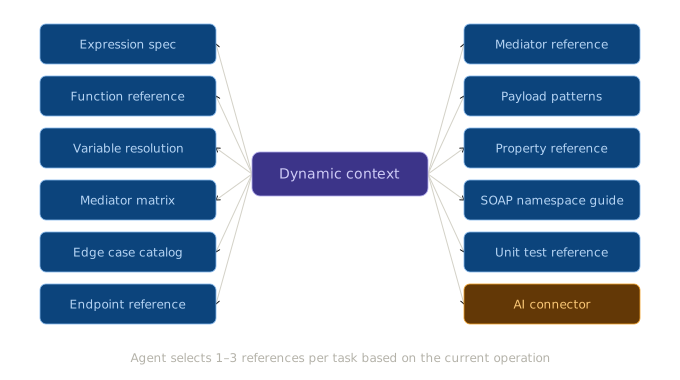
The insight: most questions only need 1-2 specific reference documents. An agent building a REST API doesn’t need the SOAP namespace guide. An agent debugging expressions doesn’t need the endpoint reference.
The load_context_reference Tool: Agent-Driven Knowledge Retrieval
We implemented a tool that lets the agent decide what knowledge it needs and load it on demand:
KNOWLEDGE_GRAPH = registry of context references, each with:
    name          : canonical identifier (e.g., "synapse-expression-spec")
    description   : one-line summary the agent reads to decide relevance
    full_content  : complete document (~3-6K tokens)
    sections      : map of { section_name → section_content } for granular loading
    min_version?  : optional runtime version gate
    aliases?      : alternative names the agent might use

Example entries:
    "synapse-expression-spec"     → operators, type system, coercion, null handling, JSONPath
    "synapse-function-reference"  → string, math, type-check, conversion, datetime, access
    "synapse-mediator-reference"  → enrich, call, send, payloadFactory, property, ...
    ... 9 more contexts
Each context reference supports section-level loading. The agent can request a full document or a specific section using colon syntax:
load_context_reference("synapse-expression-spec")              → Full doc (~6K tokens)
load_context_reference("synapse-expression-spec:type_coercion") → One section (~1K tokens)
The 12 Context References
| Reference | Sections | Typical Load |
|---|---|---|
synapse-expression-spec | operators, type_system, type_coercion, null_handling, jsonpath, … | 1-6K tokens |
synapse-function-reference | string_functions, math_functions, datetime_functions, … | 1-5K tokens |
synapse-variable-resolution | payload, headers, properties, params, configs, registry | 1-4K tokens |
synapse-mediator-expression-matrix | per-mediator expression support, payload state transitions | 2-5K tokens |
synapse-edge-cases | type gotchas, null handling, XML escaping, error catalog | 2-4K tokens |
synapse-endpoint-reference | HTTP, Address, WSDL, failover, loadbalance patterns | 2-5K tokens |
synapse-mediator-reference | enrich, call, send, payloadFactory, property, … | 3-6K tokens |
synapse-payload-patterns | JSON/XML construction, format conversion, FreeMarker | 2-5K tokens |
synapse-property-reference | HTTP properties, content-type, error handling, scopes | 2-4K tokens |
synapse-soap-namespace-guide | SOAP calls, WSDL namespace, WS-Addressing | 2-4K tokens |
unit-test-reference | test schema, assertions, mock services, examples | 2-5K tokens |
ai-connector-app-development | AI connector: chat, RAG, knowledge base, agents | 3-5K tokens |
Context Selector Parser: Flexible Input Normalization
The parser handles inconsistent input gracefully through dual normalization:
NORMALIZE_CONTEXT_NAME(input):
    lowercase → replace underscores and spaces with hyphens
    "synapse_expression_spec"  →  "synapse-expression-spec"
    "synapse expression spec"  →  "synapse-expression-spec"

NORMALIZE_SECTION_NAME(input):
    lowercase → replace hyphens and spaces with underscores
    "type-system"   →  "type_system"
    "Type System"   →  "type_system"
This eliminates a class of errors where the model hallucinates slightly wrong names -synapse_expression_spec works just as well as synapse-expression-spec.
Alias support adds another layer of robustness -a context can be found by any of its names:
"unit-test-reference" aliases: ["unit_test_reference", "unit-test-guide"]
Runtime Version Gating
Some contexts are only valid for specific MI runtime versions:
LOAD_CONTEXT("ai-connector-app-development"):
    runtime_version = detect_from_pom_xml(project_path)
    IF runtime_version < 4.4.0:
        RETURN error: "Context requires MI runtime 4.4.0+. Detected: {runtime_version}"
    ELSE:
        RETURN ai_connector_documentation
This prevents the agent from generating code that uses features unavailable in the user’s runtime -a subtle but critical correctness guarantee.
Why Not Just RAG?
Traditional RAG (Retrieval-Augmented Generation) 4 with vector embeddings would seem like the obvious approach. We chose structured references instead for several reasons:
-
Precision over recall: For a domain-specific agent, we need exact reference information (operator precedence tables, type coercion rules), not “similar” chunks. A vector search might return the right neighborhood but miss the critical table.
-
Section-level granularity: Our section structure gives the agent control over how much context to load. Vector search returns fixed-size chunks that may split a table or combine unrelated content.
-
Agent-driven selection: The agent reads the section descriptions in its system prompt and decides what to load based on reasoning, not embedding similarity. This leverages the model’s understanding of what information it needs.
-
Determinism: Given the same query, the agent loads the same reference. No embedding drift, no index staleness.
That said, this position has nuance -structured references win for platform documentation where precision matters, but we’re adding vector search for a fundamentally different query type: searching user code for conceptual patterns. We discuss this evolution in Section 10 (What Didn’t Work) and Section 11 (What’s Next).
5. Multi-Agent Orchestration
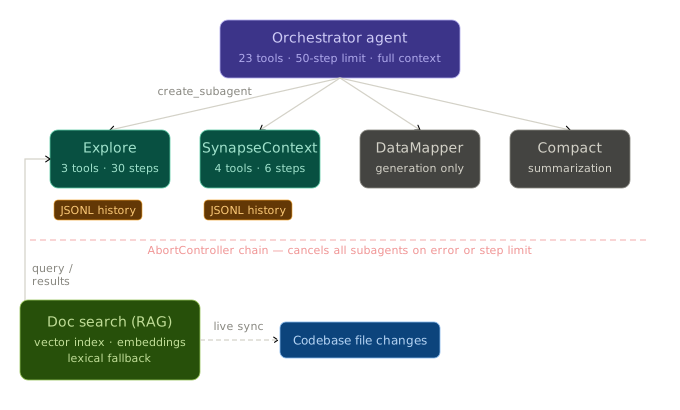
Single-agent architectures hit limitations when tasks require both breadth (exploring a codebase) and depth (reasoning about architecture). MI Copilot addresses this with a multi-agent system inspired by the orchestrator-worker pattern described in Anthropic’s agent design patterns 5.
The Agent Hierarchy
Each subagent has a fundamentally different operating profile:
Explore Subagent: Fast Codebase Search
The Explore subagent is designed for rapid, broad codebase investigation. It gets three read-only tools (file_read, grep, glob) and up to 30 steps to find what it needs:
EXPLORE_SUBAGENT = run_agent(
    model       = Haiku (fast, cheap),
    tools       = [file_read, grep, glob],     // read-only subset -no mutations possible
    max_tokens  = 8,000,
    temperature = 0.2,                          // focused, low creativity
    stop_after  = 30 steps                      // ~10 cycles of glob → grep → read
)
The system prompt is carefully scoped: “Be fast and efficient -don’t read unnecessary files. Answer the specific question.” It includes common MI project paths so the subagent knows where to look.
The 30-step limit is intentional -it allows 10+ cycles of “glob to find files → grep to search content → read to verify”, which is sufficient for most exploration tasks.
SynapseContext Subagent: Deep Documentation Lookup
The SynapseContext subagent gets the same three file tools plus load_context_reference -access to the full knowledge graph. But it’s constrained to just 6 steps (intentionally tight).
Its system prompt is more opinionated: “You are a subagent -the main agent is smarter than you. Your value is fast, accurate reference lookups. Load 1-2 docs, extract what’s relevant, return it. Don’t keep loading hoping to find it.”
This asymmetry is deliberate. The SynapseContext subagent’s job is retrieval, not reasoning. It loads reference documents, extracts the relevant portions, and returns them. The main agent does the reasoning.
Subagent Tool Isolation
Each subagent gets an independently constructed tool set -not a filtered view of the main agent’s tools:
Explore subagent tools:         { file_read, grep, glob }
SynapseContext subagent tools:  { file_read, grep, glob, load_context_reference }
DataMapper subagent tools:      { }   // pure generation, no tool access
Compact subagent tools:         { }   // processes message history only
These are fresh tool instances scoped to the project path -not references to the main agent’s tools. Subagents cannot accidentally modify files, trigger builds, or spawn their own subagents because the tool schemas simply don’t exist in their context.
Background Execution with AbortController Chaining
Subagents can run in the background, allowing the main agent to continue working:
// Main agent spawns a background subagent:
result = CREATE_SUBAGENT(
    type             = "Explore",
    prompt           = "Find all API definitions that use the Database connector",
    run_in_background = true
)
// Returns IMMEDIATELY with: { subagent_id: "task-subagent-a1b2c3" }
// Subagent executes concurrently in a fire-and-forget promise

// Later, main agent polls for results:
output = TASK_OUTPUT(task_id = "task-subagent-a1b2c3")
// Returns: { completed: true/false, output: "...", exit_code: ... }
The cancellation signal is chained from parent to child:
subagent_abort_controller = new AbortController()

ON main_agent.abort:
    subagent_abort_controller.abort(reason)    // propagate cancellation downstream

ON kill_task("task-subagent-a1b2c3"):
    subagent_abort_controller.abort()          // kill only this subagent
When the user cancels the main agent, the abort propagates to all background subagents. When a specific subagent is killed via kill_task, only that subagent’s controller fires.
JSONL History: Resumable Subagent Execution
Each subagent’s conversation is persisted to JSONL, enabling resumption:
~/.wso2-mi/copilot/projects/{project-key}/{session-id}/subagents/{task-id}/
├── history.jsonl       # Full message history (tool calls + results)
└── metadata.json       # { subagentType: "Explore", createdAt: "..." }
The main agent can resume a completed subagent with new instructions:
RESUME_SUBAGENT(
    type   = "Explore",
    resume = "task-subagent-a1b2c3",                              // reference to prior run
    prompt = "Now also check the sequences directory for similar patterns"
)

// Internally, the resumed subagent receives:
messages = [
    ...previous_messages_from_jsonl,                               // full prior conversation
    { role: user, content: "Continue Exploration: {new_prompt}" }  // new instructions appended
]
This pattern avoids re-executing expensive search operations and preserves the subagent’s accumulated understanding.
Compact Agent: Context Window Management
Long conversations approach the context limit. The Compact agent (Haiku) summarizes the conversation while preserving technical details:
COMPACT_CONVERSATION:
    1. Convert tool-call/result blocks to plain text descriptions
       (Haiku doesn't need tool schemas -just the textual content)
    2. Merge consecutive same-role messages
       (Anthropic API requires strict user/assistant alternation)
    3. Append summarization instructions as final user message

    summary = GENERATE_TEXT(
        model       = Haiku,
        system      = main_agent_system_prompt,    // full context for domain awareness
        messages    = converted_text_messages,
        tools       = all_23_tool_definitions,     // included for context, never executed
        max_tokens  = 16,000,
        temperature = 0                            // deterministic summary
    )
    4. Extract <summary> from response
    5. Replace conversation history with summary checkpoint in JSONL
The summary replaces the conversation history, and the main agent continues with full context about what was previously discussed.
6. Prompt Caching and Context Economics
Anthropic’s prompt caching allows marking portions of the request as cacheable, with cached reads costing 0.1x the base price (90% discount) vs. a 1.25x write penalty. The cache has a 5-minute TTL and requires a minimum of 1,024 tokens.
MI Copilot uses a two-tier caching strategy:
Tier 1: System Prompt (Always Cached)
The system prompt (~10-15K tokens including tool definitions) is tagged as cacheable:
system_message = {
    role:    "system",
    content: build_system_prompt(runtime_version),
    cache:   ephemeral     // Anthropic caches this block across requests (5-min TTL)
}
On the first call, this costs 1.25x (cache write). On every subsequent call within 5 minutes, it costs 0.1x (cache read). Since the system prompt doesn’t change within a session, this is essentially free after the first message.
Tier 2: Conversation History (Dynamic Caching)
The before_each_step hook marks the last message in the array with cache control before each API call:
BEFORE_EACH_STEP(messages):
    messages.last().cache = ephemeral    // growing conversation prefix stays cached
This creates an incrementally growing cached prefix:
Turn 1: [SYSTEM ✓cached] [User msg ✓cached]
Turn 2: [SYSTEM ✓cached] [User msg ✓cached] [Assistant ✓cached] [User msg → NEW cache write]
Turn 3: [SYSTEM ✓cached] [User+Asst+User ✓cached] [Assistant ✓cached] [User msg → NEW cache write]
Real-World Cost Impact
For a typical 10-turn conversation:
| Turn | Input Tokens | Cached Tokens | Cache Ratio | Effective Cost |
|---|---|---|---|---|
| 1 | 12,500 | 0 | 0% | 12,500 (+ 1.25x write) |
| 2 | 15,000 | 12,500 | 83% | ~3,750 |
| 3 | 20,000 | 17,000 | 85% | ~4,700 |
| 5 | 35,000 | 30,000 | 86% | ~8,500 |
| 10 | 60,000 | 52,000 | 87% | ~13,200 |
Cumulative savings: ~81% average across the session, reaching 87-90% on individual turns in longer conversations. The 81% figure is the session-wide average weighed down by the first turn (0% cache). By turn 5+, individual turn ratios consistently exceed 85%.
The agent logs cache metrics on every step:
[agent] Cache ratio: 86.7% | Input: 8,234 | Cached: 53,412 | Output: 1,847
The Other Side of Context Economics: Tool Result Bloat
Caching makes the input cheap, but there’s a second cost dimension: tool results accumulate in the conversation. A single grep across a large project can return 30KB+ of results. After a few tool calls, the context window fills with tool results, not useful reasoning.
MI Copilot addresses this with a persistence layer that intercepts oversized tool results:
AFTER_TOOL_EXECUTION(tool_name, result):
    IF result.length > 30KB:
        file_path = "{session_dir}/tool-results/{timestamp}-{tool_name}.txt"
        WRITE full result to file_path

        RETURN TO MODEL:
            "<persisted-output>
             Output too large ({size}). Full output saved to: {file_path}
             Preview (first 2KB):
             {result[0..2048]}...
             </persisted-output>"
    ELSE:
        RETURN result as-is

    // Recursion guard: if file_read is called on a tool-results/ path,
    // skip persistence to prevent infinite write-read-write loops
The model sees a preview with a file path. If it needs the full content, it can file_read the persisted file -and the recursion guard prevents that read from being persisted again.
Auto-cleanup enforces limits: 7-day retention, max 50 files, 20MB total per session.
This pattern keeps the conversation lean while ensuring no information is lost.
7. Shell Sandboxing: Letting an Agent Run Commands Safely
Trust the agent to reason; don’t trust it with
sudo.
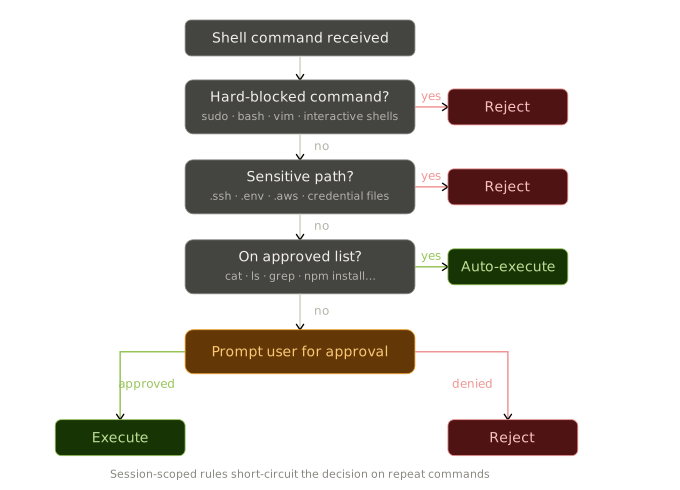
An agent that can only read and write files is fundamentally limited. Real development workflows require running builds, starting servers, checking logs, and executing project scripts. MI Copilot gives the agent a shell tool -but with a security sandbox that prevents the class of catastrophic failures that make unsandboxed agents dangerous.
Three-Tier Command Classification
Every shell command is parsed and classified before execution:
CLASSIFY_COMMAND(command_tokens):

    TIER 1 -SAFE (auto-allowed, no user prompt):
        Read-only commands: cat, grep, ls, head, tail, pwd, which, stat,
                           tree, wc, sort, uniq, du, dirname, realpath, ...
        → Execute immediately

    TIER 2 -REQUIRES APPROVAL (shown to user first):
        Mutation commands: mkdir, cp, npm install, git commit, mvn build, ...
        Wrapper commands: env, xargs (can execute arbitrary sub-commands)
        Network commands not on safe list
        → Show command to user → wait for approve/deny

    TIER 3 -HARD BLOCKED (rejected unconditionally):
        Interactive shells: bash, sh, zsh, powershell
        Elevated execution: sudo, doas, su
        Interactive editors: vim, nano, emacs
        Process monitors: top, htop, watch, less, more, man
        → Return error: "Command '{cmd}' is blocked for safety."
The classification is conservative -unknown commands default to requiring approval. This ensures new tools the model discovers can’t bypass the sandbox.
Path Sandboxing: Preventing Escape via Symlinks
A subtle attack vector: the model could write a symlink inside the project that points to /etc/passwd, then read it through the “safe” file_read tool. The sandbox prevents this by resolving all paths through realpath before checking boundaries:
RESOLVE_SAFE_PATH(target_path):
    absolute = resolve_to_absolute(target_path)
    real     = realpath(absolute)         // follows symlinks to true location

    IF real does NOT exist:
        walk up parent directories until one exists
        resolve THAT parent via realpath
        rejoin the non-existent child segments
        // prevents /project/../../etc/passwd via non-existent intermediate paths

    IF real is outside [project_directory, /tmp]:
        BLOCK: "Path resolves outside project boundary"

    RETURN real
Sensitive Path Protection
Certain paths are unconditionally blocked regardless of project boundaries:
BLOCKED DIRECTORY SEGMENTS:  .ssh, .aws, .azure, .gnupg, .kube, .npm, .pypirc
BLOCKED FILE NAMES:          .env, .env.*, .bashrc, .zshrc, .netrc, .npmrc,
                             .git-credentials, id_rsa, id_ed25519, authorized_keys,
                             credentials, known_hosts, ...
The check inspects every segment of the path -so cat ~/.ssh/id_rsa, cat /home/user/.ssh/config, and cat project/.env.production are all caught, regardless of how the model constructs the command.
Session-Scoped Approval Rules
Requiring approval for every npm run build would be unusable. The sandbox supports “remember for this session” rules:
ON user approves "npm install lodash":
    STORE prefix rule: ["npm", "install"]

ON next command "npm install express":
    MATCH against stored rules: ["npm", "install"] is prefix of ["npm", "install", "express"]
    → Auto-approve (skip user prompt)

EXCEPTIONS -always re-prompt:
    Destructive commands (rm -rf, git reset --hard)
    Complex syntax (pipes, subshells, command substitution)
    Blocked commands (never auto-approve)
Plan Mode: Read-Only Shell
In Plan mode, the shell sandbox adds an additional layer -only read-only exploration is allowed:
PLAN_MODE_SHELL_FILTER(command):
    ALLOW: ls, cat, grep, rg, find, git status, git diff, git log
    BLOCK: output redirection (>, >>), git mutations (add, commit, push),
           package managers (npm, pip, mvn), file operations (rm, mv, cp, mkdir),
           build tools
This lets the agent investigate the project during planning without accidentally making changes.
8. LSP Integration: Ground-Truth Validation in the Loop
This is perhaps the most critical advantage MI Copilot has over a general-purpose agent: a language server that provides ground-truth validation of generated code.
The Validation Problem
When Claude Code generates a Python function, the user can run it and see if it works. When an agent generates Synapse XML, the feedback loop is much slower -you need to build the project, deploy to MI, send a test request, and check the logs. By the time you discover the XML is invalid, the agent has moved on.
MI Copilot closes this feedback loop by integrating the LemMinx XML Language Server directly into the agent’s tool chain.
How It Works: WorkspaceEdit + LSP Sync
The key architectural decision: all file operations go through VS Code’s WorkspaceEdit API, not direct filesystem writes.
AGENT_WRITES_FILE(path, content):
    1. Create a WorkspaceEdit transaction
    2. IF file exists:
           Replace entire document range with new content
       ELSE:
           Create file + insert content at position 0
    3. Apply edit via VS Code API (atomic operation)
           → VS Code notifies LemMinx of the change (automatic)
           → LemMinx re-validates the file against the Synapse XSD schema
    4. Save the document
    5. Fetch diagnostics from LemMinx for the file
    6. RETURN structured validation result to the agent

    Result format:
    {
        validated:     true,
        error_count:   2,
        warning_count: 1,
        diagnostics: [
            { severity: "error",   line: 45, message: "Element 'api' not found in schema",
              code_actions: ["Add missing namespace declaration"] },
            { severity: "error",   line: 78, message: "Invalid attribute 'timeout'",
              code_actions: ["Use 'readTimeOut' instead"] },
            { severity: "warning", line: 123, message: "Deprecated element usage",
              code_actions: ["Replace with 'http-endpoint'"] }
        ]
    }
This means every file_write and file_edit automatically validates the result. The agent sees validation errors as part of the tool response and can fix them in the next ReAct step -without the user ever seeing invalid XML.
Code Actions: LSP Quick Fixes as Agent Guidance
The validation result includes code actions -quick fix suggestions from the language server. These are not generic “fix this error” messages; they’re specific, actionable fixes that the language server can apply:
Diagnostics for CustomerAPI.xml:
  ✗ Line 45: Element 'send' is not valid here
    Available fixes:
      - "Replace with 'call' mediator"
      - "Move inside 'inSequence' block"
  ✗ Line 78: Attribute 'uri' is required
    Available fixes:
      - "Add required 'uri' attribute"
The agent receives these as structured data and can use the suggested fixes to self-correct. This creates a tight generate → validate → fix loop that typically converges in 1-2 iterations.
Why Not Just Trust the Model?
Without LSP validation, the agent has to rely on its training data to generate valid XML -and as we discussed in Section 2, its priors for Synapse XML are unreliable. The language server provides a ground-truth oracle that catches:
- Schema violations -elements in wrong positions, missing required attributes
- Namespace errors -incorrect or missing XML namespace declarations
- Connector misconfigurations -invalid operation names, wrong parameter types
- Deprecation warnings -using old element names when newer alternatives exist
This is fundamentally different from how general-purpose agents work. Claude Code generates Python and hopes the user runs it. MI Copilot generates XML, validates it against the schema immediately, and fixes issues before the user even sees the result.
The Validation-as-a-Tool Pattern
We also expose validation as a standalone validate_code tool for cases where the agent wants to validate files it didn’t just write -for example, batch-validating an entire project or re-validating after adding a connector dependency:
VALIDATE_CODE(file_paths = ["api/CustomerAPI.xml", "api/OrderAPI.xml"]):
    FOR EACH file:
        IF NOT xml_file: SKIP
        diagnostics = LemMinx.get_code_diagnostics(file)
        code_actions = LemMinx.get_code_actions(file, diagnostics)
    RETURN structured results for all files
The tool description explicitly notes that file_write/file_edit already validate automatically -preventing redundant LSP round-trips.
9. The Mode System: Structured Autonomy
The three-mode system (Ask/Edit/Plan) controls how much autonomy the agent has at any given time.
Mode-Aware Tool Execution (Not Schema Removal)
A naive approach to restricting tool access would be to remove tools from the schema when they’re not available. MI Copilot takes a different approach -all tools remain in the schema, but blocked tools return descriptive errors at execution time:
WRAP_TOOL_FOR_MODE(tool_name, mode, original_execute):
    IF mode == "ask" AND tool_name NOT IN read_only_tools:
        RETURN error:
            "Tool '{tool_name}' is not available in ASK mode. Switch to EDIT mode."

    IF mode == "plan" AND tool_name is a mutation tool:
        IF tool_name == file_write AND target_path is within plan_directory:
            ALLOW    // plan file edits are permitted
        ELSE:
            RETURN error:
                "Tool '{tool_name}' blocked in PLAN mode. Only read-only and planning tools allowed."

    ELSE:
        RETURN original_execute(args)    // full access in EDIT mode
Why? Because removing tools from the schema changes the model’s behavior in unpredictable ways -it may try to accomplish the same goal through other means (like writing a shell command instead of using file_edit). Keeping tools visible but returning a clear error lets the model understand why it can’t act and suggest the appropriate mode switch to the user.
Plan Mode: Design Before Build
Plan mode implements a structured planning workflow inspired by the “think before you act” pattern in the agent literature. The agent can investigate the codebase, load documentation, and ask questions -but it cannot modify any project files. It writes its plan to a dedicated plan file:
~/.wso2-mi/copilot/projects/{key}/{session}/plan/plan.md
The exit_plan_mode tool blocks execution until the user approves or rejects the plan. This creates a human-in-the-loop checkpoint for complex tasks where the cost of a wrong implementation is high.
10. What Didn’t Work: Approaches We Tried and Discarded
No architecture emerges fully formed. Several design decisions in MI Copilot were born from approaches that failed or underperformed. These are worth documenting because they make the surviving architecture feel earned rather than obvious.
The “Everything in the System Prompt” Phase
Our first approach was straightforward: put all Synapse documentation -guides, connector definitions, expression references -into the system prompt. This reached ~60K tokens before the user even typed a message. The results were poor in three ways: (1) the model couldn’t find relevant information buried in an enormous prompt, (2) every API call was expensive, and (3) information about connectors the user wasn’t using actively diluted attention from the connectors they needed.
The dynamic knowledge graph (Section 4) was the direct response. By making the agent decide what to load, we cut baseline context by 75% and improved accuracy on domain-specific questions because the loaded context was always relevant.
Single-Agent Doing Everything
The initial architecture had one agent doing all tasks: codebase search, documentation lookup, code generation, and validation. For simple tasks, this worked fine. For complex tasks, the agent would spend 15-20 tool calls just finding the right files before it could start reasoning about them -and those search steps consumed context that was needed for the actual implementation.
Delegating search to lightweight Explore and SynapseContext subagents (Section 5) solved this. The main agent stays focused on reasoning and implementation while subagents handle the information-gathering legwork. The step count asymmetry (30 for Explore, 6 for SynapseContext) emerged from observing real usage patterns -exploration is iterative, but reference lookups should be fast or not attempted.
The RAG Attempt
We prototyped a vector search system for Synapse documentation early on. It performed well on broad questions (“how do I handle errors in Synapse?”) but failed on precise lookups (“what is the type coercion rule for integer + double?”). The problem is that our reference documentation contains tables, operator precedence charts, and code examples where every row matters. A vector search returning the 5 most similar chunks would often return the right section but miss the critical row in a table.
We kept the structured knowledge graph for platform documentation where precision is paramount, but our position has evolved: semantic search is the right tool for a different query type -searching user code for conceptual patterns rather than looking up exact specifications. That’s what the planned vector search layer (Section 11) addresses.
Subagent Failure: What Happens When Things Go Wrong
One area we iterated on significantly: subagent error handling. The current approach is explicit failure surfacing rather than silent retry:
ON subagent error (timeout, model error, abort):
    IF background subagent:
        Mark task as completed with success = false
        Store error message in output
        Main agent discovers failure on next TASK_OUTPUT poll
        → Agent decides: retry with different prompt, try different approach, or report to user
    IF foreground subagent:
        Return error result directly to main agent's tool call
        → Agent sees: { success: false, message: "Subagent failed: {error}" }
        → Agent decides next action (no automatic retry)
We deliberately chose not to implement automatic retries. The main agent (Sonnet) is smarter than the subagent (Haiku) and better positioned to decide whether to retry the same approach, reformulate the query, or try a different strategy entirely. Silent retries would waste tokens on the same failing approach and hide information from the orchestrator.
The auto-cleanup timer (1 hour) prevents orphaned background subagents from accumulating -a production concern that only became visible under sustained usage.
11. What’s Next: Local Embeddings and Semantic Code Retrieval
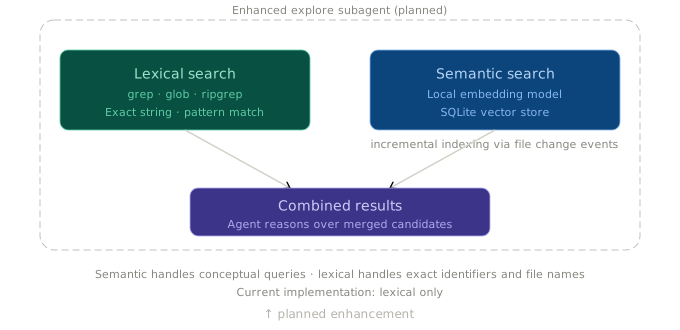
The current knowledge system is powerful but has a limitation: the agent’s codebase exploration relies on lexical search (grep, glob) and model-driven reasoning about what to look for. For large projects, this can be slow -the Explore subagent might need 10-15 tool calls to find the right files.
Planned: Local Embedding Model + SQLite Vector Database
We’re building a local semantic search layer that will dramatically accelerate code discovery:
Architecture:
- A lightweight embedding model running locally (no API calls, no data leaves the machine)
- SQLite with vector extensions for the index (single-file, zero-config)
- Incremental indexing triggered by file changes
- The Explore subagent gets a new
semantic_searchtool alongsidegrep/glob
The key workflow change: Instead of the Explore subagent making 10+ grep calls to triangulate on the right files, it starts with a semantic query:
semantic_search("error handling with retry logic for external API calls")
→ Returns top-5 file snippets ranked by cosine similarity
→ Agent reads 1-2 most relevant files
→ Task complete in 3 steps instead of 15
This is complementary to the structured knowledge graph (Section 4). The knowledge graph handles platform documentation where precision over recall is critical; the vector search handles user code where conceptual similarity is the right retrieval strategy. Two different query types, two different retrieval mechanisms.
Planned: MI Documentation Subagent
We also plan to add a dedicated subagent for searching WSO2 MI’s external documentation -similar to how SynapseContext queries embedded reference docs, but backed by the full product documentation with web search capability. This will handle questions that go beyond the core reference material: deployment guides, configuration best practices, version migration paths, and community solutions.
Conclusion: What Surprised Us
If you’ve read this far, you have the architecture. What follows is what we didn’t expect when we started.
Context engineering mattered more than model selection. We assumed upgrading from Haiku to Sonnet to Opus would be the primary quality lever. It wasn’t. The single biggest accuracy improvement came from adding the edge case documentation -a static text file. The second biggest came from LSP validation. Model upgrades were third. For domain-specific agents, what you put in the context window matters more than which model reads it.
The agent is better when it doesn’t trust itself. Our most counterintuitive finding: the agent produces better results when we give it tools to check its work rather than prompts to be more careful. Telling the model “be precise with Synapse expressions” in the system prompt had negligible impact. Giving it a validate_code tool that returns schema errors had massive impact. External verification beats internal confidence.
Cheap models are surprisingly good at retrieval. We expected to need Sonnet for the Explore and SynapseContext subagents. Haiku turned out to be sufficient -and often preferable. Retrieval tasks (find files, load docs, extract relevant sections) don’t benefit from stronger reasoning. The subagent step limits (30 for Explore, 6 for SynapseContext) emerged from the realization that if Haiku can’t find it in that budget, more steps won’t help -the query needs reformulation, and the orchestrator is better at that.
Sandboxing complexity scales faster than tool count. Adding the shell tool was a single function. Making it safe required path resolution, symlink detection, command classification, session approval rules, plan-mode restrictions, and sensitive file pattern matching -an order of magnitude more code than the tool itself. Every new mutation tool pulls in security considerations that compound.
If we started over, we’d build the LSP integration and the knowledge graph first, before any agent logic. Those two systems -ground-truth validation and precise domain context -are the foundation everything else stands on. The ReAct loop, subagents, caching, and sandboxing are all important, but they amplify the value of correct context and verified output. Without those, you’re just making a fast, cheap agent that’s confidently wrong.
These patterns are not MI-specific. Any domain-specific coding assistant -for Terraform, Kubernetes, database schemas, game engines -would benefit from the same architecture. The key insight is that domain specificity is a feature, not a limitation. When you know your domain, you can engineer context that a general-purpose assistant never could. The model doesn’t need to be an expert in your domain -it needs the right information, the right tools, and a way to verify its own work.
References
WSO2 MI Copilot is available in the WSO2 Integrator: MI VS Code extension. The architecture described here is production code, not a prototype.
-
Yao, S., et al. (2023). “ReAct: Synergizing Reasoning and Acting in Language Models.” ICLR 2023. https://arxiv.org/abs/2210.03629 ↩
-
Wei, J., et al. (2022). “Chain-of-Thought Prompting Elicits Reasoning in Large Language Models.” NeurIPS 2022. https://arxiv.org/abs/2201.11903 ↩
-
Anthropic. (2025). “Building Effective Agents.” Anthropic Documentation. https://docs.anthropic.com/en/docs/build-with-claude/prompt-engineering/overview ↩
-
Lewis, P., et al. (2020). “Retrieval-Augmented Generation for Knowledge-Intensive NLP Tasks.” NeurIPS 2020. https://arxiv.org/abs/2005.11401 ↩
-
Anthropic. (2025). “Agent Design Patterns: Orchestrator-Workers.” Anthropic Documentation. https://docs.anthropic.com/en/docs/build-with-claude/agentic-patterns ↩